The structure of the Palmetto Cluster
Overview
Teaching: 15 min
Exercises: 0 minQuestions
What is the structure of the Palmetto Cluster?
Objectives
compute and login nodes, hardware table,
whatsfree
The computers that make up the Palmetto cluster are called nodes. Most of the nodes on Palmetto are compute nodes,
that can perform fast calculations on large amounts of data. There is also a special node called the login node; it runs the server,
which works like the interface
between the cluster
and the outside world. The people with Palmetto accounts can log into the server by running a client (such as ssh) on their local machines.
Our client program passes our login credentials to this server, and if we are allowed to log in, the server runs a shell for us.
Any commands that we enter into this shell are executed not by our own machines, but by the login node.
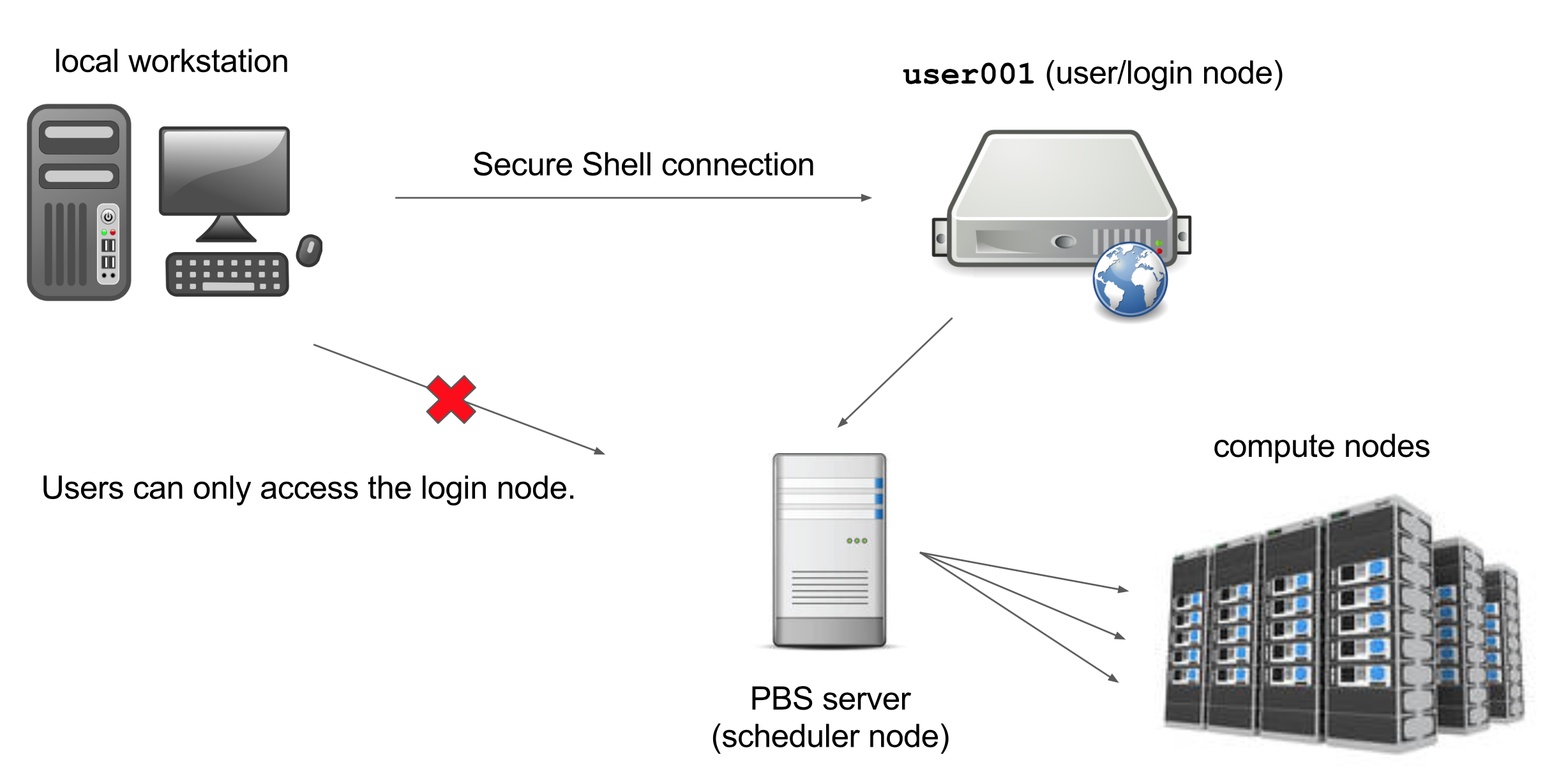
Another special node is the scheduler; Palmetto users can get from the login node to the compute nodes by submitting a request to the scheduler, and the scheduler will assign them to the most appropriate compute node. Palmetto also has a few so-called “service” nodes, which serve special purposes like transferring code and data to and from the cluster, and hosting web applications.
To see the hardware specifications of the compute nodes, please type
cat /etc/hardware-table
This will print out a text file with the hardware info. Please make sure you type exactly as shown; Linux is case-sensitive space-sensitive, and typo-sensitive. The output will look something like this:
PALMETTO HARDWARE TABLE      Last updated:  Jun 15 2020

PHASE COUNT  MAKE   MODEL    CHIP(0)                CORES  RAM(1)    /local_scratch   Interconnect     GPUs  SSD

 0      6    HP     DL580    Intel Xeon    7542       24   505 GB(2)    99 GB         1ge               0     0
 0      5    Dell   R820     Intel Xeon    E5-4640    32   750 GB(2)   740 GB(12)     10ge              0     0
 0      1    HP     DL560    Intel Xeon    E5-4627v4  40   1.5 TB(2)   881 GB         10ge              0     0
 0      1    Dell   R830     Intel Xeon    E5-4627v4  40   1.0 TB(2)   880 GB         10ge              0     0
 0      1    HPE    DL560    Intel Xeon    6138G      80   1.5 TB(2)   3.6 TB         10ge              0     0
 0      1    HPE    DL560    Intel Xeon    6148G      80   1.5 TB(2)   3.6 TB         10ge              0     0
 0      1    HPE    DL560    Intel Xeon    6148G      80   1.5 TB(2)   745 GB(12)     10ge              0     0

 1a   116    Dell   R610     Intel Xeon    E5520       8    31 GB      220 GB         1g                0     0
 1b    40    Dell   R610     Intel Xeon    E5645      12    92 GB      220 GB         1g                0     0
 2a    30    Dell   R620     Intel Xeon    E5-2660    16   375 GB      2.7 TB         1g                0     0
 2b   134    Dell   PE1950   Intel Xeon    E5410       8    15 GB       37 GB         1g                0     0
 3    224    Sun    X2200    AMD   Opteron 2356        8    15 GB      193 GB         1g                0     0
 4    323    IBM    DX340    Intel Xeon    E5410       8    15 GB      111 GB         1g                0     0
 5a   310    Sun    X6250    Intel Xeon    L5420       8    31 GB       31 GB         1g                0     0
 5b     9    Sun    X4150    Intel Xeon    E5410       8    31 GB       99 GB         1g                0     0
 5c    19    Dell   R510     Intel Xeon    E5640       8    22 GB        7 TB         1g                0     0
 5d    20    Dell   R520     Intel Xeon    E5-2450    12    46 GB      2.7 TB         1g                0     0
 6     66    HP     DL165    AMD   Opteron 6176       24    46 GB      193 GB         1g                0     0

 7a    42    HP     SL230    Intel Xeon    E5-2665    16    62 GB      240 GB         56g, fdr, 10ge    0     0
 7b    12    HP     SL250s   Intel Xeon    E5-2665    16    62 GB      240 GB         56g, fdr, 10ge    2(3)  0
 8a    71    HP     SL250s   Intel Xeon    E5-2665    16    62 GB      900 GB         56g, fdr, 10ge    2(4)  300 GB(7)
 8b    57    HP     SL250s   Intel Xeon    E5-2665    16    62 GB      420 GB         56g, fdr, 10ge    2(4)  0
 8c    88    Dell   PEC6220  Intel Xeon    E5-2665    16    62 GB      350 GB         56g, fdr, 10ge    0     0
 9     72    HP     SL250s   Intel Xeon    E5-2665    16   126 GB      420 GB         56g, fdr, 10ge    2(4)  0
10     80    HP     SL250s   Intel Xeon    E5-2670v2  20   126 GB      800 GB         56g, fdr, 10ge    2(4)  0
11a    40    HP     SL250s   Intel Xeon    E5-2670v2  20   126 GB      800 GB         56g, fdr, 10ge    2(6)  0
11b     4    HP     SL250s   Intel Xeon    E5-2670v2  20   126 GB      800 GB         56g, fdr, 10ge    0     0
12     30    Lenovo NX360M5  Intel Xeon    E5-2680v3  24   126 GB      800 GB         56g, fdr, 10ge    2(6)  0
13     24    Dell   C4130    Intel Xeon    E5-2680v3  24   126 GB      1.8 TB         56g, fdr, 10ge    2(6)  0
14     12    HPE    XL1X0R   Intel Xeon    E5-2680v3  24   126 GB      880 GB         56g, fdr, 10ge    2(6)  0
15     32    Dell   C4130    Intel Xeon    E5-2680v3  24   126 GB      1.8 TB         56g, fdr, 10ge    2(6)  0
16     40    Dell   C4130    Intel Xeon    E5-2680v4  28   126 GB      1.8 TB         56g, fdr, 10ge    2(8)  0
17     20    Dell   C4130    Intel Xeon    E5-2680v4  28   126 GB      1.8 TB         56g, fdr, 10ge    2(8)  0
18a     2    Dell   C4140    Intel Xeon    6148G      40   372 GB      1.9 TB(12)    100g, hdr, 10ge    4(9)  0
18b    65    Dell   R740     Intel Xeon    6148G      40   372 GB      1.8 TB        100g, hdr, 25ge    2(10) 0
18c    10    Dell   R740     Intel Xeon    6148G      40   748 GB      1.8 TB        100g, hdr, 25ge    2(10) 0
19a    28    Dell   R740     Intel Xeon    6248G      40   372 GB      1.8 TB        100g, hdr, 25ge    2(10) 0
19b     4    HPE    XL170    Intel Xeon    6252G      48   372 GB      1.8 TB         56g, fdr, 10ge    0     0

  *** PBS resource requests are always lowercase ***

(0) CHIP has 3 resources:   chip_manufacturer, chip_model, chip_type
(1) Leave 2 or 3GB for the operating system when requesting memory in PBS jobs
(2) Specify queue "bigmem" to access the large memory machines, only ncpus and mem are valid PBS resource requests
(3) 2 NVIDIA Tesla M2075 cards per node, use resource request "ngpus=[1|2]" and "gpu_model=m2075"
(4) 2 NVIDIA Tesla K20m cards per node, use resource request "ngpus=[1|2]" and "gpu_model=k20"
(5) 2 NVIDIA Tesla M2070-Q cards per node, use resource request "ngpus=[1|2]" and "gpu_model=m2070q"
(6) 2 NVIDIA Tesla K40m cards per node, use resource request "ngpus=[1|2]" and "gpu_model=k40"
(7) Use resource request "ssd=true" to request a chunk with SSD in location /ssd1, /ssd2, and /ssd3 (100GB max each)
(8) 2 NVIDIA Tesla P100 cards per node, use resource request "ngpus=[1|2]" and "gpu_model=p100"
(9) 4 NVIDIA Tesla V100 cards per node with NVLINK2, use resource request "ngpus=[1|2|3|4]" and "gpu_model=v100nv"
(10)2 NVIDIA Tesla V100 cards per node, use resource request "ngpus=[1|2]" and "gpu_model=v100"
(11)Phase18a nodes contain NVMe storage for /local_scratch.
(12)local_scratch is housed entirely on SSD
We have more than 2,000 compute nodes. They are grouped into phases; all nodes within a phase have the same hardware specifications. The compute nodes in Phase 0 have very large amount of RAM, up to 1.5 Tb. The nodes in phases 1 to 6 are connected to each other with 1g Ethernet connection; they have at least 8 CPUs and at least 15 Gb of RAM. Nodes in phases 7 and up are connected with InfiniBand connection, which is much faster than Ethernet. They are, on average, more powerful than the 1g nodes: they have at least 16 CPUs and at least 62 Gb of RAM. Most of them also have GPUs (videocards); they are typically not used for video processing, but rather for some computation-heavy procedures such as machine learning applications. About 600 compute nodes on Palmetto have GPUs. The InfiniBand nodes are more popular than the 1g nodes, so we have stricter limits on their use: one can use the 1g nodes for up to 168 hours at a time, whereas one can use an InfiniBand node for up to 72 hours.
To see which nodes are available at the moment, you can type
whatsfree
You will see something like this:
Mon Aug 03 2020 22:37:26

TOTAL NODES: 2102     NODES FREE: 2035     NODES OFFLINE: 14     NODES RESERVED: 0

PHASE 0    TOTAL =  16  FREE =  15  OFFLINE =   0  BIGMEM nodes: (6) 24cores/500GB, (5) 32cores/750GB, (3) 80cores/1.5TB, (1) 40cores/1.5TB, (1) 40cores/1TB, (1) 64cores/2TB
PHASE 1a   TOTAL = 117  FREE =  94  OFFLINE =   0  TYPE = Dell   R610    Intel Xeon  E5520,      8 cores,  31GB, 1g
PHASE 1b   TOTAL =  40  FREE =  40  OFFLINE =   0  TYPE = Dell   R610    Intel Xeon  E5645,     12 cores,  94GB, 1g
PHASE 2a   TOTAL =  30  FREE =  30  OFFLINE =   0  TYPE = Dell   R620    Intel Xeon  E5-2660    16 cores, 382GB, 1g
PHASE 2b   TOTAL = 162  FREE = 162  OFFLINE =   0  TYPE = Dell   PE1950  Intel Xeon  E5410,      8 cores,  15GB, 1g
PHASE 3    TOTAL = 224  FREE = 224  OFFLINE =   0  TYPE = Sun    X2200   AMD Opteron 2356,       8 cores,  15GB, 1g
PHASE 4    TOTAL = 319  FREE = 319  OFFLINE =   0  TYPE = IBM    DX340   Intel Xeon  E5410,      8 cores,  15GB, 1g
PHASE 5a   TOTAL = 308  FREE = 308  OFFLINE =   0  TYPE = Sun    X6250   Intel Xeon  L5420,      8 cores,  30GB, 1g
PHASE 5b   TOTAL =   9  FREE =   9  OFFLINE =   0  TYPE = Sun    X4150   Intel Xeon  E5410,      8 cores,  15GB, 1g
PHASE 5c   TOTAL =  34  FREE =  34  OFFLINE =   0  TYPE = Dell   R510    Intel Xeon  E5460,      8 cores,  23GB, 1g
PHASE 5d   TOTAL =  23  FREE =  23  OFFLINE =   0  TYPE = Dell   R520    Intel Xeon  E5-2450    12 cores,  46GB, 1g
PHASE 6    TOTAL =  65  FREE =  64  OFFLINE =   0  TYPE = HP     DL165   AMD Opteron 6176,      24 cores,  46GB, 1g
PHASE 7a   TOTAL =  42  FREE =  38  OFFLINE =   0  TYPE = HP     SL230   Intel Xeon  E5-2665,   16 cores,  62GB, FDR
PHASE 7b   TOTAL =  12  FREE =   0  OFFLINE =   0  TYPE = HP     SL250s  Intel Xeon  E5-2665,   16 cores,  62GB, FDR, M2075
PHASE 8a   TOTAL =  71  FREE =  61  OFFLINE =   0  TYPE = HP     SL250s  Intel Xeon  E5-2665,   16 cores,  62GB, FDR, K20, SSD
PHASE 8b   TOTAL =  57  FREE =  57  OFFLINE =   0  TYPE = HP     SL250s  Intel Xeon  E5-2665,   16 cores,  62GB, FDR, K20
PHASE 8c   TOTAL =  88  FREE =  78  OFFLINE =  10  TYPE = Dell   PEC6220 Intel Xeon  E5-2665,   16 cores,  62GB, 10ge
PHASE 9    TOTAL =  72  FREE =  69  OFFLINE =   0  TYPE = HP     SL250s  Intel Xeon  E5-2665,   16 cores, 125GB, FDR, K20, 10ge
PHASE 10   TOTAL =  80  FREE =  76  OFFLINE =   0  TYPE = HP     SL250s  Intel Xeon  E5-2670v2, 20 cores, 125GB, FDR, K20, 10ge
PHASE 11a  TOTAL =  40  FREE =  39  OFFLINE =   0  TYPE = HP     SL250s  Intel Xeon  E5-2670v2, 20 cores, 125GB, FDR, K40, 10ge
PHASE 11b  TOTAL =   4  FREE =   4  OFFLINE =   0  TYPE = HP     SL250s  Intel Xeon  E5-2670v2, 20 cores, 125GB, FDR, Phi, 10ge
PHASE 12   TOTAL =  30  FREE =  30  OFFLINE =   0  TYPE = Lenovo MX360M5 Intel Xeon  E5-2680v3, 24 cores, 125GB, FDR, K40, 10ge
PHASE 13   TOTAL =  24  FREE =  24  OFFLINE =   0  TYPE = Dell   C4130   Intel Xeon  E5-2680v3, 24 cores, 125GB, FDR, K40, 10ge
PHASE 14   TOTAL =  12  FREE =  12  OFFLINE =   0  TYPE = HP     XL190r  Intel Xeon  E5-2680v3, 24 cores, 125GB, FDR, K40, 10ge
PHASE 15   TOTAL =  32  FREE =  32  OFFLINE =   0  TYPE = Dell   C4130   Intel Xeon  E5-2680v3, 24 cores, 125GB, FDR, K40, 10ge
PHASE 16   TOTAL =  40  FREE =  37  OFFLINE =   0  TYPE = Dell   C4130   Intel Xeon  E5-2680v4, 28 cores, 125GB, FDR, P100, 10ge
PHASE 17   TOTAL =  20  FREE =  20  OFFLINE =   0  TYPE = Dell   C4130   Intel Xeon  E5-2680v4, 28 cores, 125GB, FDR, P100, 10ge
PHASE 18a  TOTAL =   2  FREE =   0  OFFLINE =   0  TYPE = Dell   C4140   Intel Xeon  6148G,     40 cores, 372GB, HDR, V100nv, 10ge
PHASE 18b  TOTAL =  65  FREE =  55  OFFLINE =   0  TYPE = Dell   R740    Intel Xeon  6148G,     40 cores, 372GB, HDR, V100, 25ge
PHASE 18c  TOTAL =  10  FREE =  10  OFFLINE =   0  TYPE = Dell   R740    Intel Xeon  6148G,     40 cores, 748GB, HDR, V100, 25ge
PHASE 19a  TOTAL =  28  FREE =  24  OFFLINE =   4  TYPE = Dell   R740    Intel Xeon  6248G,     40 cores, 372GB, HDR, V100, 25ge
PHASE 19b  TOTAL =   4  FREE =   3  OFFLINE =   0  TYPE = HPE    XL170   Intel Xeon  6252G,     48 cores, 372GB, 10ge
PHASE 20   TOTAL =  22  FREE =  22  OFFLINE =   0  TYPE = Dell   R740    Intel Xeon  6238R,     56 cores, 372GB, HDR, V100S, 25ge

 NOTE: Your job will land on the oldest phase that satisfies your PBS resource requests.
This table shows the amount of completely free nodes per each phase; a node which has, for example, 8 cores, but only 4 of them are used, would not be counted as “free”. So this table is a conservative estimate. Note that there are a lot more free nodes in the 1g phases, compared to the InfiniBand phases. It is a good idea to run whatsfree when you log into Palmetto, to get a picture of how busy the cluster is. This picture can change pretty drastically depending on the time of the day and the day of the week.
Key Points
Palmetto contains more than 2000 interconnected compute nodes
a phase is a group of compute nodes that have the same architecture (CPUs, RAM, GPUs)
a specialized login node runs the SSH server