Part of Speech Tagging
Overview
Teaching: 20 min
Exercises: 0 minQuestions
How to Perform POS using R
Objectives
Learn POS technique with R
12 Part of Speech Tagging
Here we use R OpenNLP to perform Part of Speech Tagging
The POS tags each token with their corresponding parts of speech, using statistics, context, meaning and their relative position with respect to adjacent tokens.
Beside existing CRAN package NLP, openNLP we need to install other library openNLPmodels.en:
install.packages("openNLPmodels.en", repos = "http://datacube.wu.ac.at/", type = "source")
Load neccesary library
Make sure all libraries are install prior to loading:
library(NLP)
library(openNLP)
library(openNLPmodels.en)
library(dplyr)
library(stringr)
library(ggplot2)
Load dataset
Here we use the dataset Gutenberg introduced in the previous step:
We use the book 105 from author “Austen, Jane” and define str1 as the content of the book
library(gutenbergr)
books <- gutenberg_works(author == "Austen, Jane")
book_105 <- gutenberg_download(105)
head(book_105$text,40)
str1 = as.String(book_105$text)
 [1] "Persuasion"      ""                "by Jane Austen"  ""
 [5] "(1818)"          ""                ""                "Contents"
 [9] ""                " CHAPTER I."     " CHAPTER II."    " CHAPTER III."
[13] " CHAPTER IV."    " CHAPTER V."     " CHAPTER VI."    " CHAPTER VII."
[17] " CHAPTER VIII."  " CHAPTER IX."    " CHAPTER X."     " CHAPTER XI."
[21] " CHAPTER XII."   " CHAPTER XIII."  " CHAPTER XIV."   " CHAPTER XV."
[25] " CHAPTER XVI."   " CHAPTER XVII."  " CHAPTER XVIII." " CHAPTER XIX."
[29] " CHAPTER XX."    " CHAPTER XXI."   " CHAPTER XXII."  " CHAPTER XXIII."
[33] " CHAPTER XXIV."  ""                ""                ""
[37] ""                "CHAPTER I."      ""                ""
Apply POS to the dataset
init_s = annotate(str1, list(Maxent_Sent_Token_Annotator(),
                               Maxent_Word_Token_Annotator()))
pos_res = annotate(str1, Maxent_POS_Tag_Annotator(), init_s)
word_subset = subset(pos_res, type=='word')
tags = sapply(word_subset$features , '[[', "POS")

pos1 = data_frame(word=str1[word_subset], pos=tags) %>%
  filter(!str_detect(pos, pattern='[[:punct:]]'))
head(pos1,10)
# A tibble: 10 x 2
   word       pos
   <chr>      <chr>
 1 Persuasion NNP
 2 by         IN
 3 Jane       NNP
 4 Austen     NNP
 5 1818       CD
 6 Contents   NNPS
 7 CHAPTER    NNP
 8 I.         NNP
 9 CHAPTER    NNP
10 II         NNP
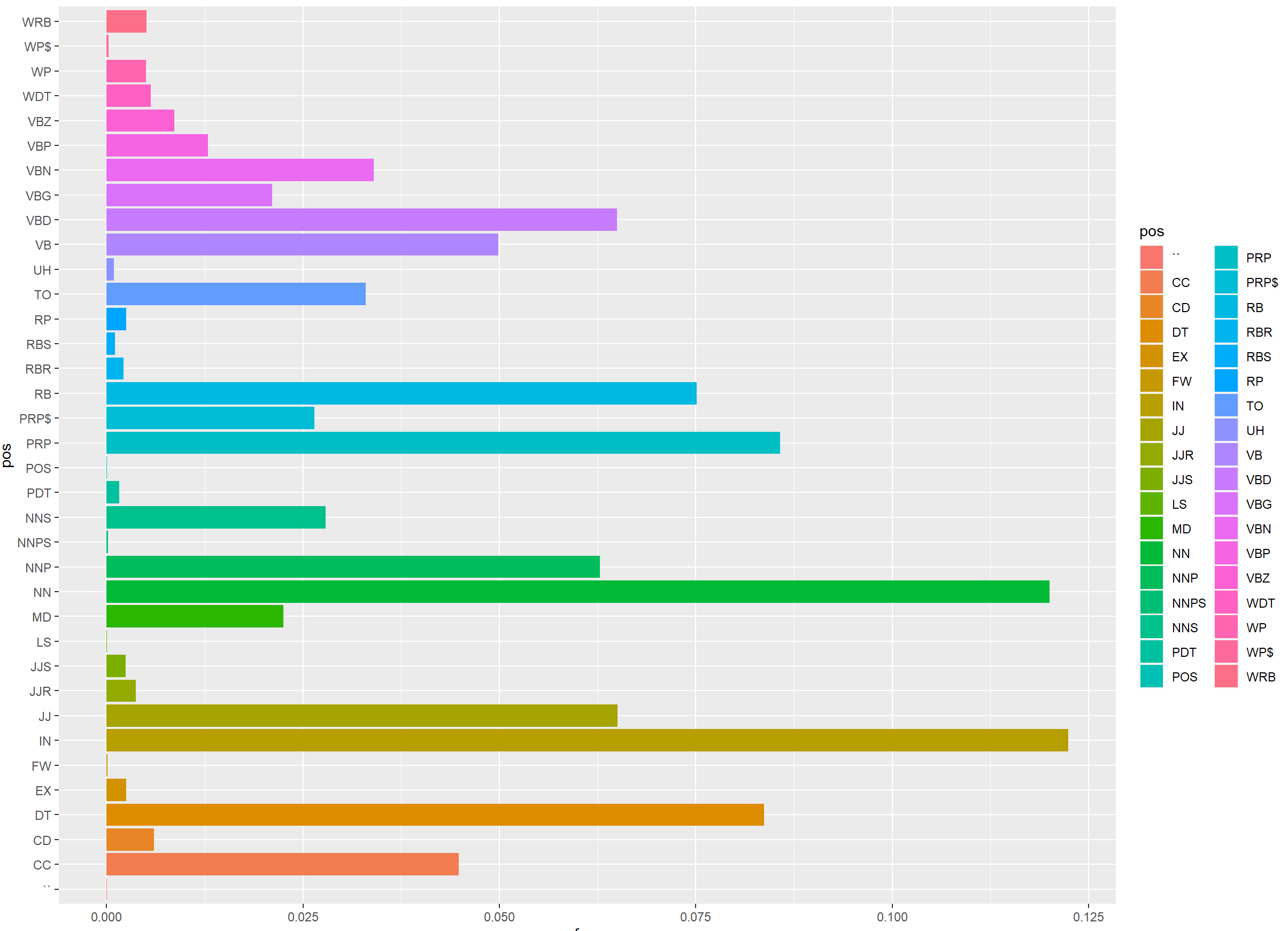
Plotting POS output
df1 = pos1 %>%
      group_by(pos) %>%
      summarise(n=n()) %>%
      mutate(freq=n/sum(n)) %>%
      arrange(desc(freq)*100)

ggplot(data=df1, aes(x=freq, y=pos,fill=pos)) +
  geom_bar(stat="identity")
Key Points
NLP, POS